Radi gardengg Start free

Backyard nursery software

Sell the plants you grow.

Stock by variety and pot size, prices with your real losses baked in, two-tap market sales, and a live availability page that takes pickup reservations. Built for plant sales, porch pickups and farmers markets, not wholesale.

Nursery tools start on Bloom ($5/mo). The storefront is on Harvest ($12/mo).

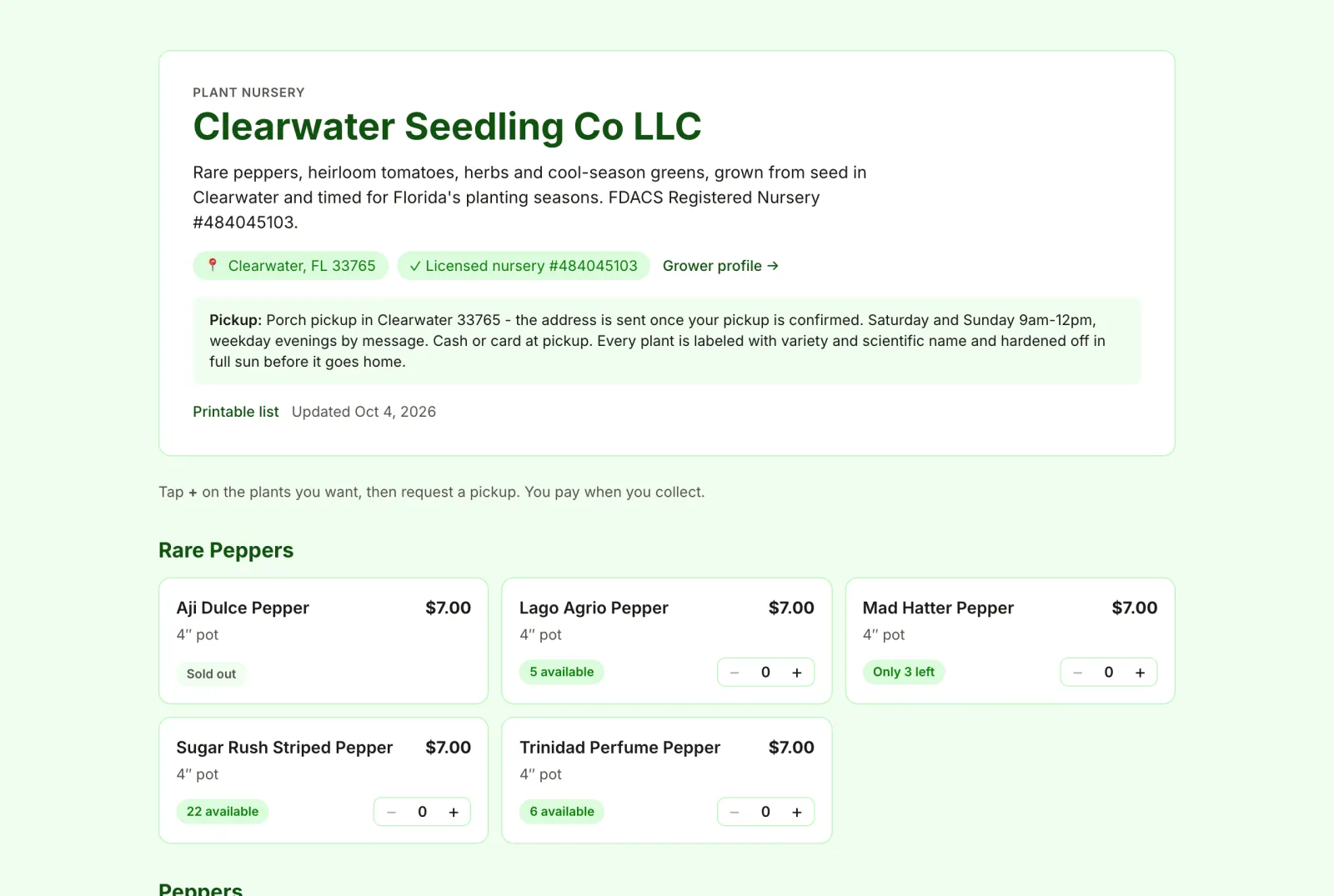
A real garden.gg nursery storefront: Clearwater Seedling Co LLC, with location and license badges, pickup instructions, and rare pepper plants listed with prices and availability.

Grow-side data built in

Pot up a rooted propagation batch and its success rate flows into cost per plant.

No payment custody

Buyers reserve and pay you at pickup. No platform fees on sales.

Web, iOS and Android

Manage stock at the desk, ring up sales at the table.

Plant tags with care QR

Every plant leaves with a tag buyers scan for care tips.

Everything a plant sale needs, nothing it doesn't

Every screenshot below is the real app, filled with Clearwater Seedling Co's public listings and sample buyers.

Stock lots

Inventory by variety, pot size and readiness

A lot is a group of identical plants: one variety, one container, one price. Pot one up straight from a rooted propagation batch with "List for sale", or add bought-in stock by hand. Every sale, loss and recount goes into an append-only stock history, so counts never drift.

  • Plug, cell pack, 4β€³ pot, quart, 1–5+ gal, bare root, unrooted cutting, division
  • "Ready now" or "Still growing" with a ready-around date
  • A "Public" switch on every lot, plus bulk "Make all public"
Read the lots and pricing guide →
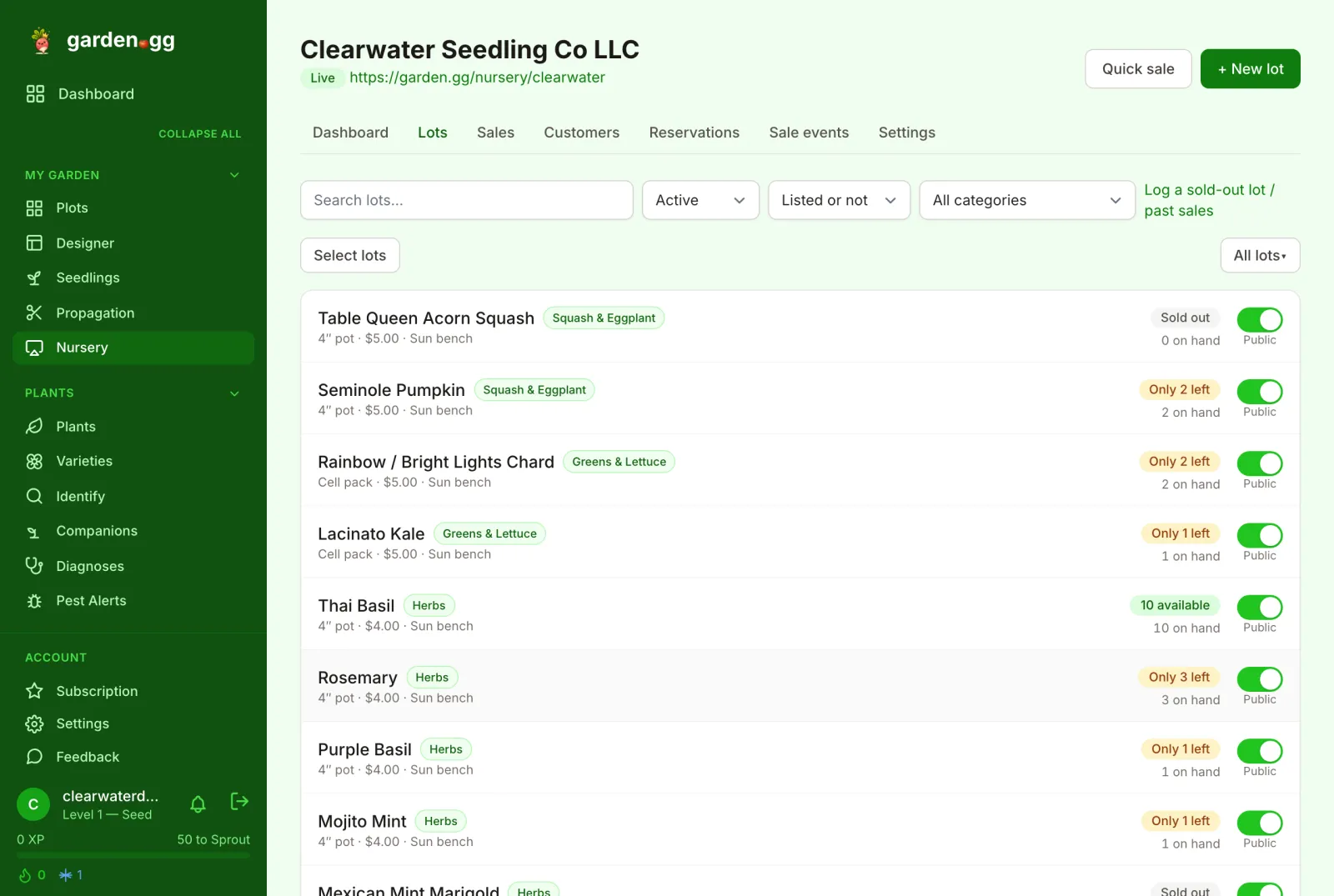
Lots list in garden.gg: each lot shows its category chip, container, price, bench location, availability badge, count on hand, and a Public switch.
Cost per plant

Prices with your losses baked in

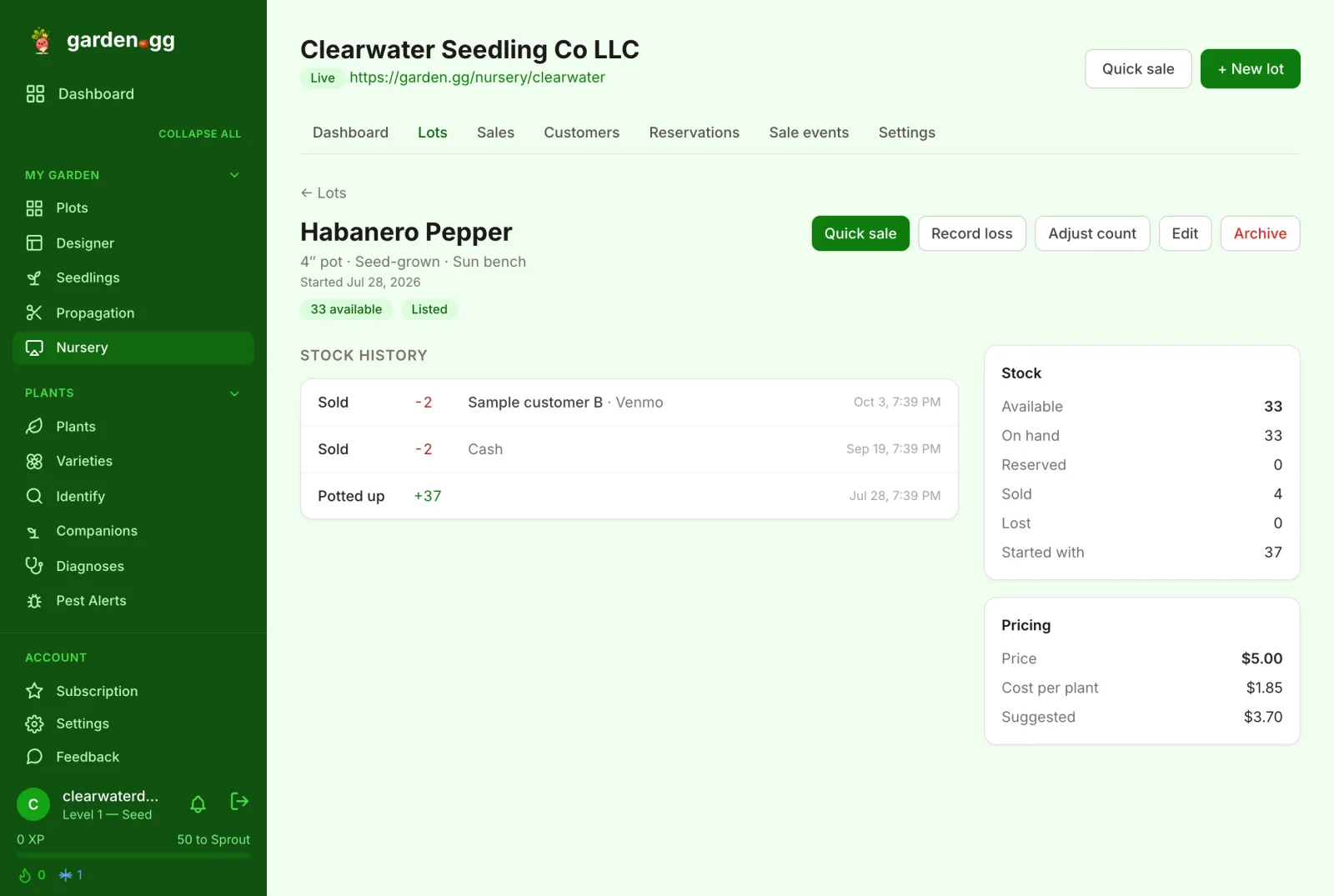
Enter pot, soil and label cost, labor minutes and your hourly rate. garden.gg divides the total by the plants that actually survived, so a batch where a quarter of the cuttings failed shows up in the cost. The suggested price is cost times your markup (2Γ— by default). It is a hint next to the price field, never applied for you.

  • "Cost per plant" and "Suggested" on every lot
  • Propagation losses carried in from the source batch
  • Default markup and labor rate set once in Settings
Read the cost-per-plant guide →
Lot detail for Habanero Pepper: stock history of sales, a Stock card with available, on hand, reserved, sold and lost counts, and a Pricing card showing price, cost per plant and suggested price.
Quick sale

A cart for the market table

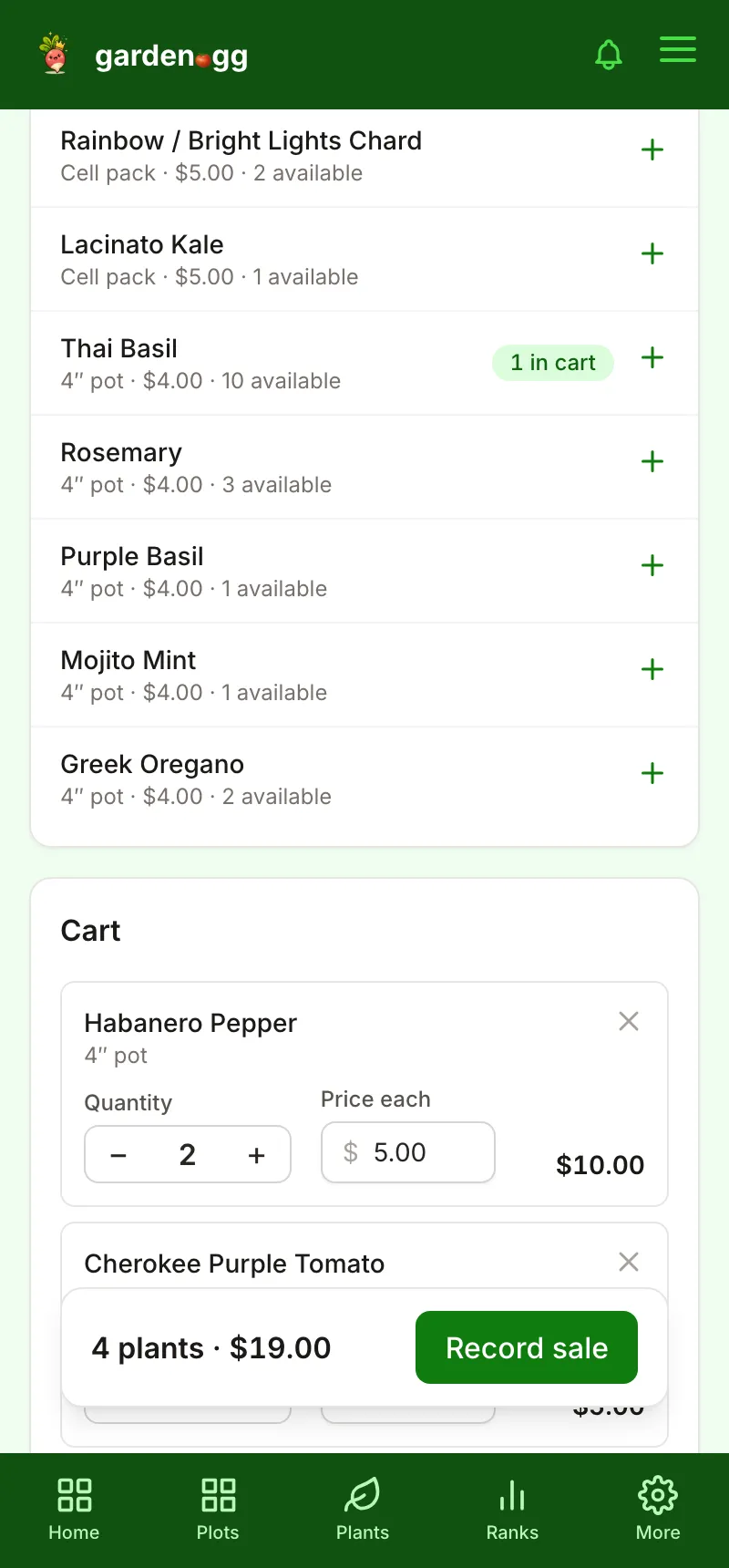
Tap each plant the buyer is taking, adjust a price for a discount, pick how they paid, and record it as one sale. On the iOS and Android apps a sale made with no signal is saved offline and syncs when you are back online; anything the server can't accept waits under "Needs attention" instead of vanishing.

  • Paid with: Cash, Venmo, Card, Trade, Other
  • Optional buyer, sale event and backdated "Date sold"
  • Retries reuse the same request ID, so a sale is never counted twice
Read the quick sale guide →
Quick sale cart on a phone: lots with an add button, a cart with Habanero Pepper and Cherokee Purple Tomato, and a sticky bar reading 4 plants, $19.00, Record sale.
Availability page

A live storefront at garden.gg/nursery/your-name

Listed lots appear on a public page grouped by your own categories, with price, container and an availability badge ("In stock", "Only 3 left", "Ready ~Oct 18", "Sold out"). It updates the moment you sell. A printable availability list and a QR poster for the sale table link back to it.

  • Your categories, in your order
  • "Show exact counts" on or off
  • Printable list (?print=1) and a one-page QR poster
Read the storefront guide →
Clearwater Seedling Co storefront on garden.gg: nursery name, blurb, location and license badges, pickup instructions, and a Rare Peppers category with price, pot size, availability badges and quantity steppers.
Reservations

Pickup requests instead of DMs

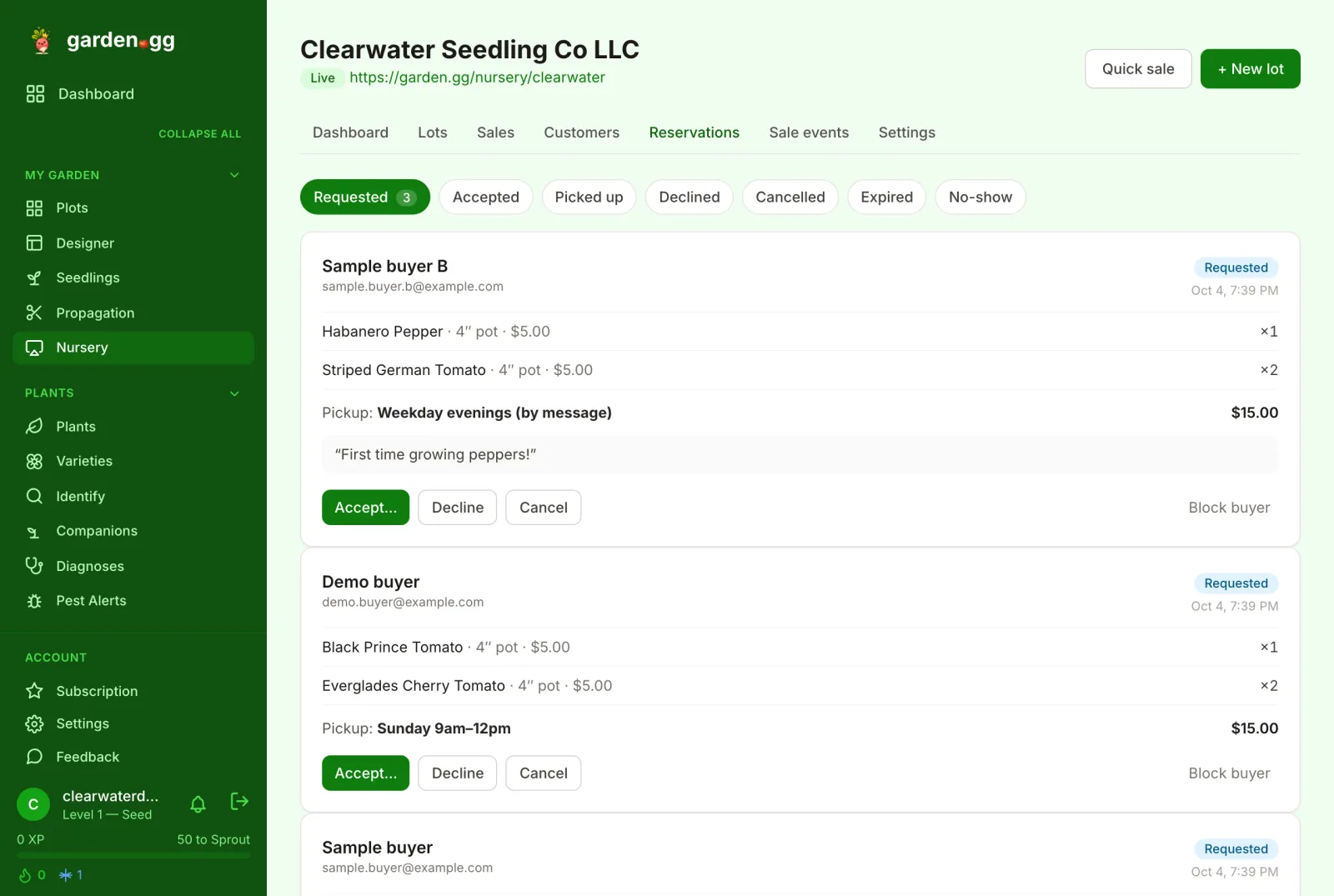
Buyers tap + on what they want, choose one of your pickup windows and send a request. Anonymous buyers confirm by email before you see it. You accept (plants are held until your hold window ends), counter with smaller quantities, or decline. Buyers get an email at each step. Unanswered requests expire after 72 hours, and "Block buyer" quietly declines future requests from a problem buyer.

  • Requested β†’ Accepted β†’ Picked up, plus No-show and Cancel
  • Picking up records the sale automatically
  • Pay at pickup: no money moves through garden.gg
Read the reservations guide →
Reservations inbox with status tabs (Requested, Accepted, Picked up, Declined, Cancelled, Expired, No-show) and request cards showing items, pickup window, total, buyer note, and Accept, Decline, Cancel and Block buyer buttons.
Sales & CSV

Every sale in one place, ready for tax time

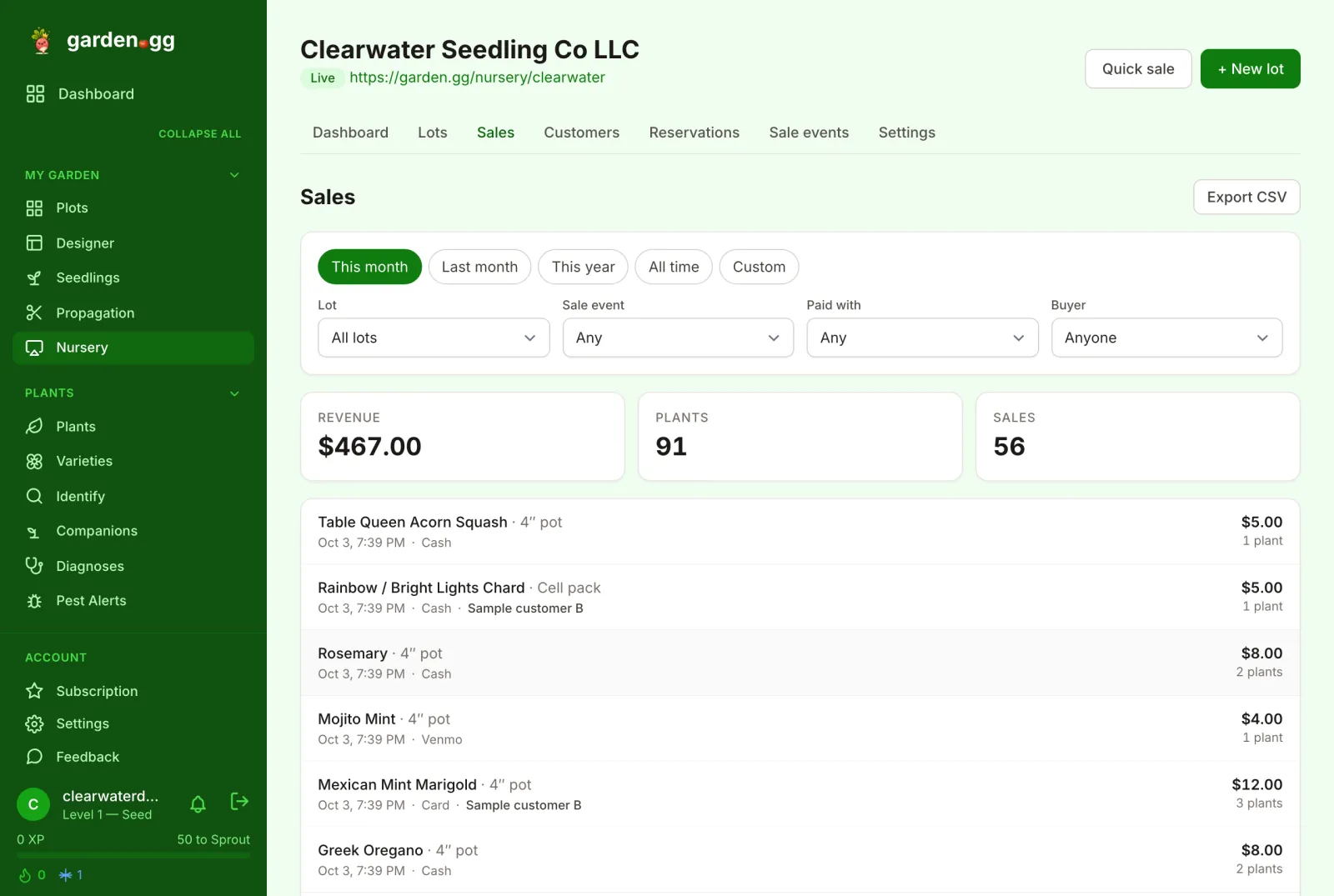
The Sales page filters by date range, lot, sale event, payment method and buyer, with revenue, plant and sale totals for whatever you filtered. "Export CSV" downloads exactly what you see. The dashboard adds sell-through, loss rate, top sellers and inventory value at cost and at retail.

  • This month, Last month, This year, All time, Custom
  • Edit a sale's date, buyer or note after the fact
  • Sale events for market days and plant swaps
Read the sales and CSV guide →
Sales page with date range chips, Lot, Sale event, Paid with and Buyer filters, revenue, plants and sales totals, an Export CSV button, and a list of individual sales.
Customers

Know your regulars

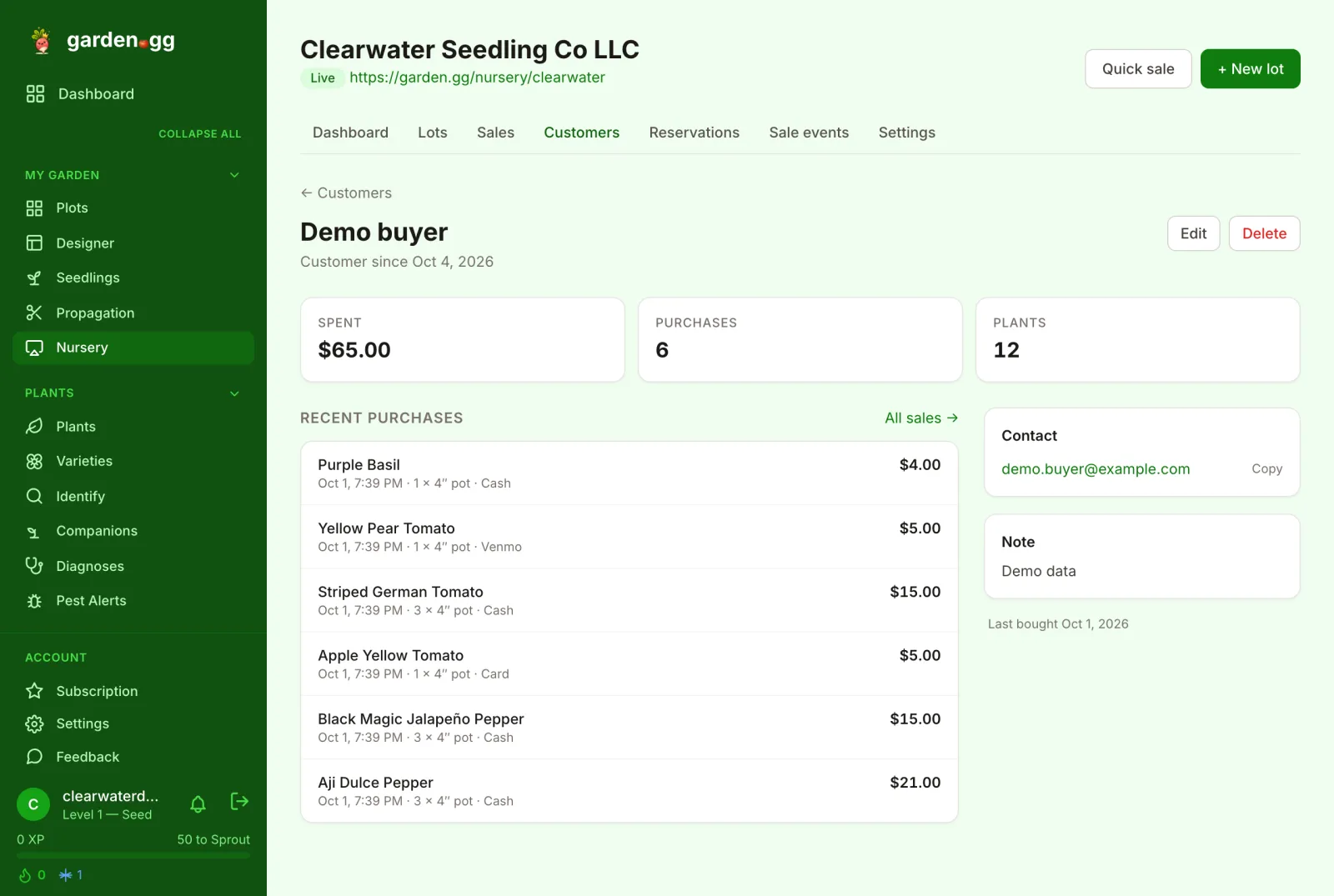
Add buyers by hand or pick "Add new customer" while you record a sale. Reservation buyers are added when they pick up. Each customer shows what they have spent, their recent purchases and contact details, visible only to you.

  • Spent, purchases and plants per customer
  • Storefront buyers are removed 12 months after their last purchase unless you keep them
  • Search by name, email or phone
Read the customers guide →
Customer detail for a sample buyer: spent, purchases and plants totals, a list of recent purchases with dates and payment methods, and a contact card.
Past sales

Bring last season with you

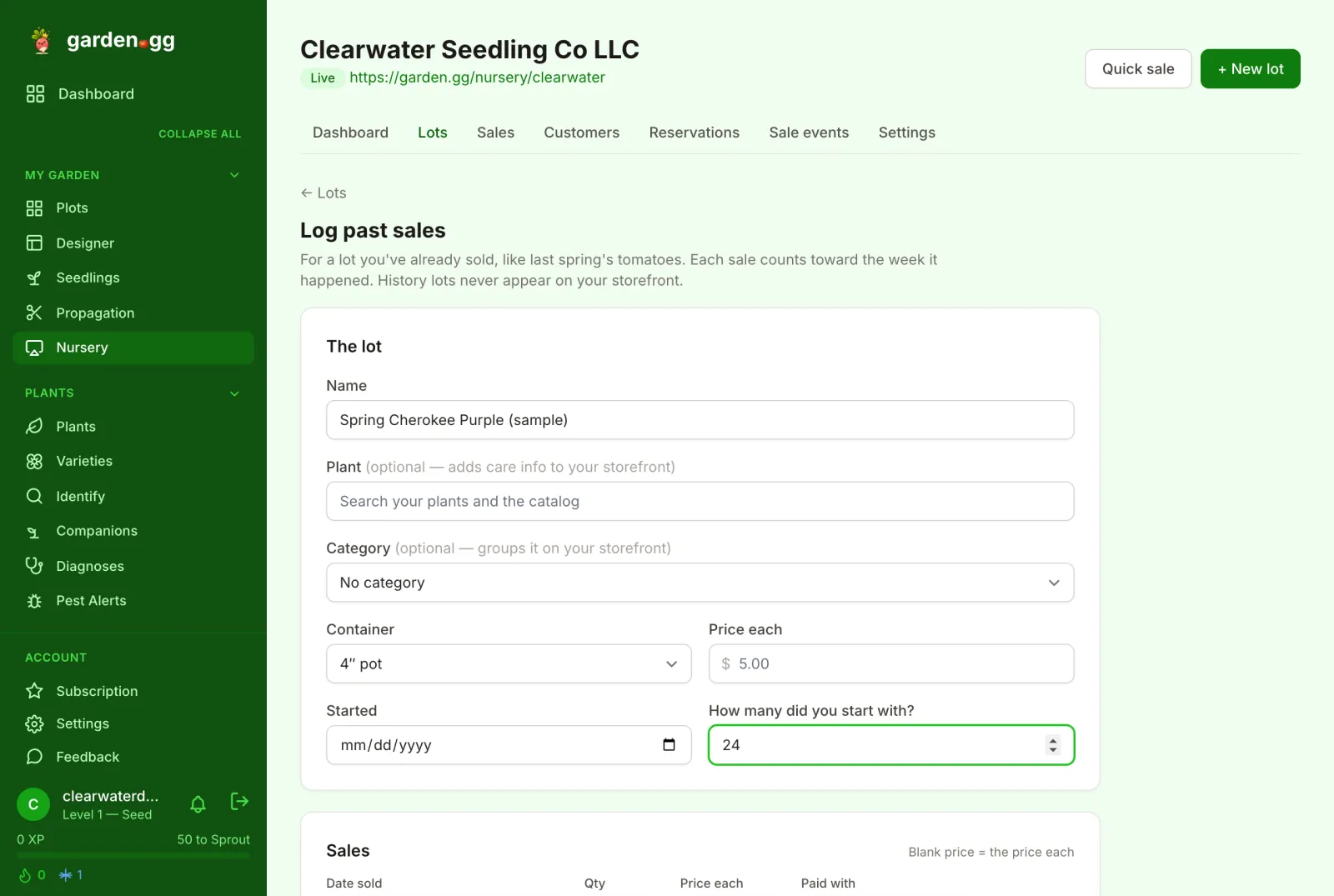
"Log past sales" records a lot you have already sold, like last spring's tomatoes, with each sale dated to the week it happened. Your reports start with real history instead of a blank slate, and history lots never appear on your storefront.

  • Up to 50 dated sales and 20 losses per lot
  • "Archive when sold out" keeps it off your active-lot limit
Read the past sales guide →
Log past sales form with fields for the lot name, plant, category, container, price each, start date and how many plants you started with.
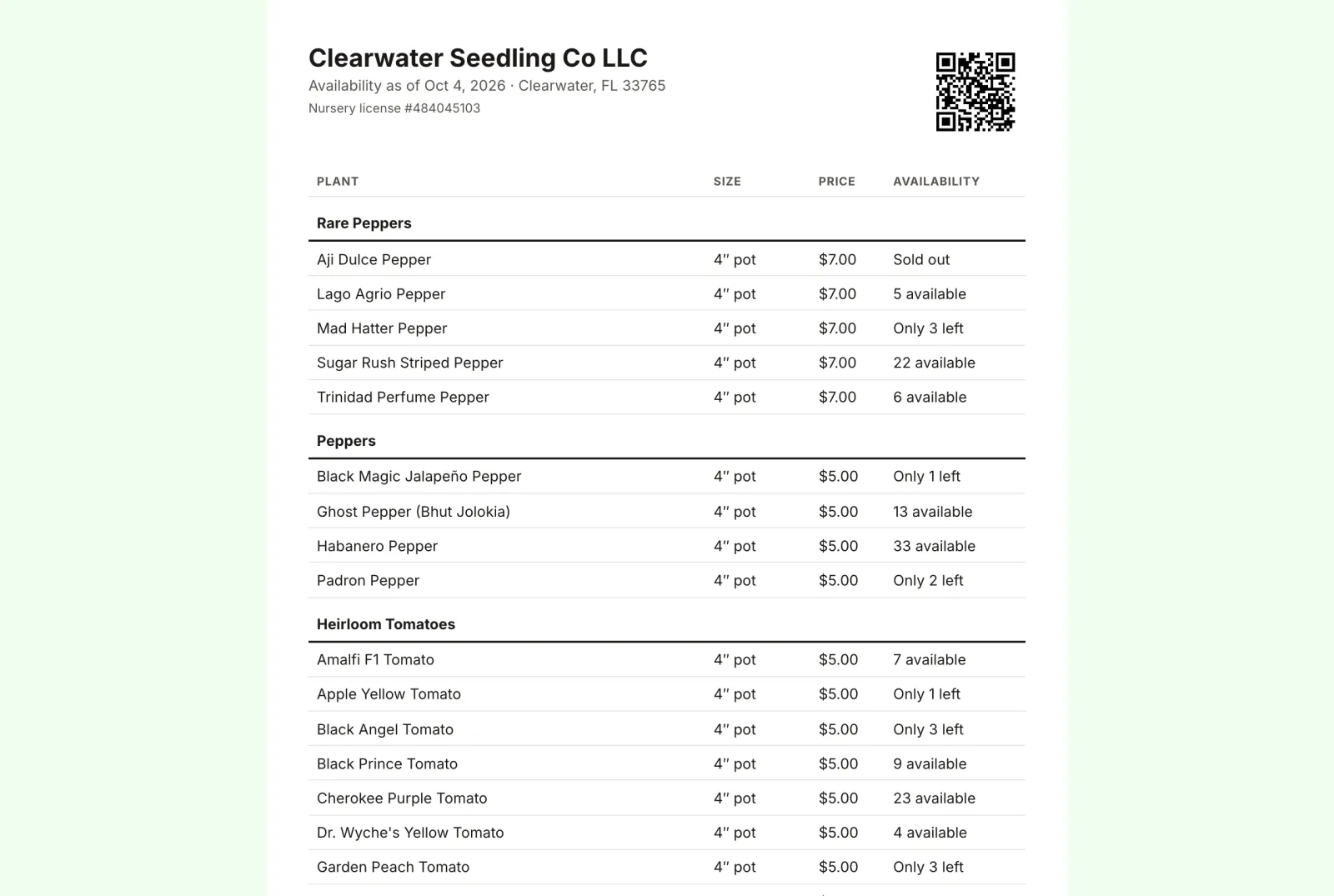
Printable availability list for Clearwater Seedling Co: a table of plants grouped by category with size, price and availability, plus a QR code to the live page.
The printable availability list: same route, ?print=1.
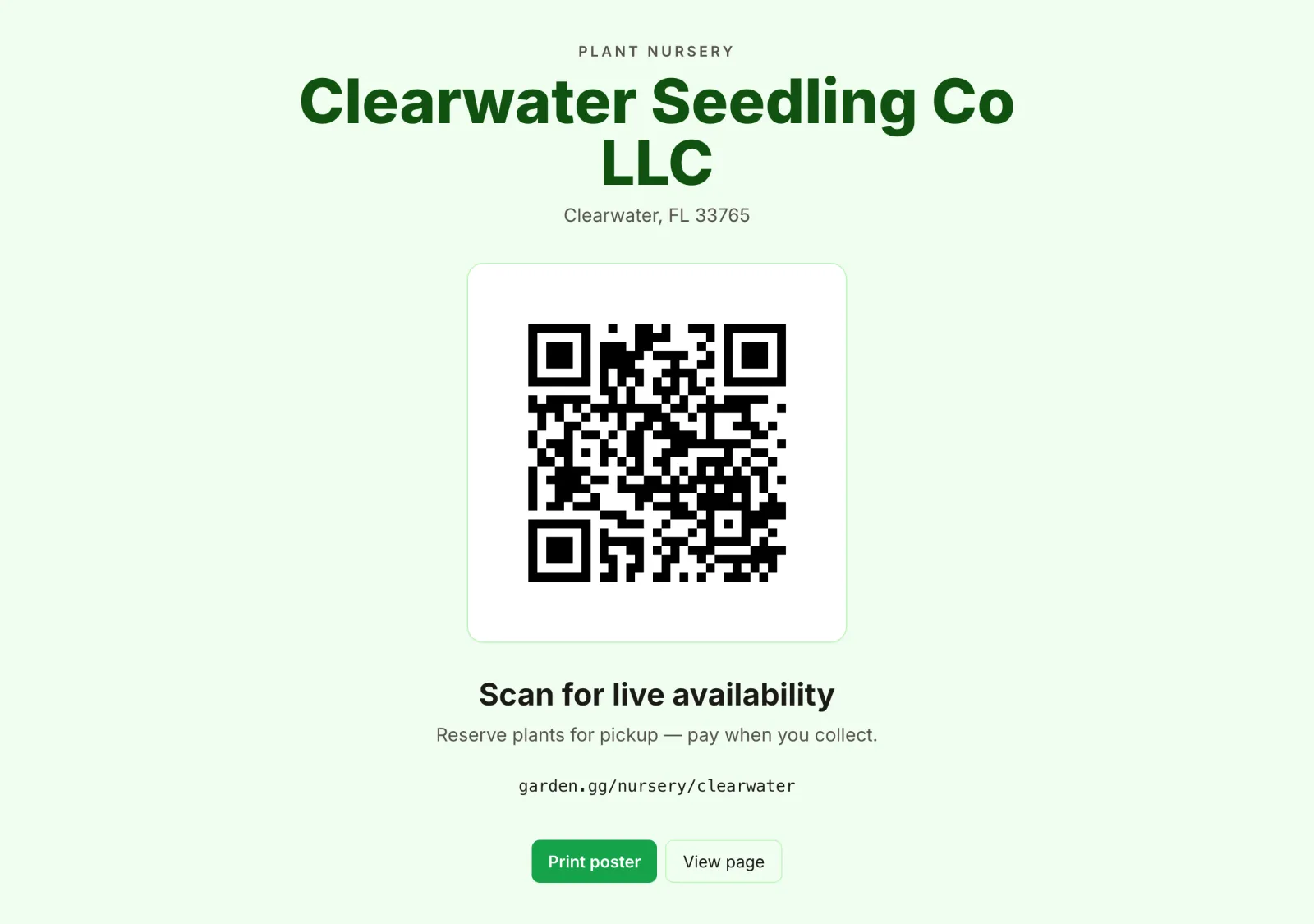
QR plant-sale poster reading Plant nursery, Clearwater Seedling Co LLC, a large QR code, and Scan for live availability. Reserve plants for pickup, pay when you collect.
The QR poster for your sale table.
Plant patent guardrail

A warning before you list a patented cultivar

Under the U.S. Plant Patent Act, propagating a patented plant and selling, swapping or gifting it is infringement for 20 years from filing. When a lot is linked to a flagged cultivar, garden.gg shows "This plant may be patented" and needs your "I hold a license to propagate this cultivar" attestation before it goes public. Private tracking always works.

Is it legal to sell cuttings of patented plants? →
Plant tags with care QR codes

Tags that keep teaching after the sale

Press "Print tags" on any lot and choose an Avery 5160 sheet or 2 Γ— 1 in / 2ΒΌ Γ— 1ΒΌ in thermal labels, how many, and whether to include the price. Each tag has the plant name, container, your nursery name and a QR code. Buyers scan it for a free care page and can "Track this plant" in garden.gg, with your nursery remembered as where it came from. Tags keep working after the lot sells out; lost a batch? "Reprint with new code" retires the old ones.

Read the plant tags guide →

Built by a backyard nursery

garden.gg's owner runs Clearwater Seedling Co LLC, a registered nursery in Clearwater, Florida, selling rare peppers, heirloom tomatoes, herbs and cool-season greens grown from seed. It was the first storefront on garden.gg and the design partner for these tools.

  • 9storefront categories
  • 57lots listed
  • 3pickup windows

Counts from the public page in October 2026.

Browse Clearwater's live page
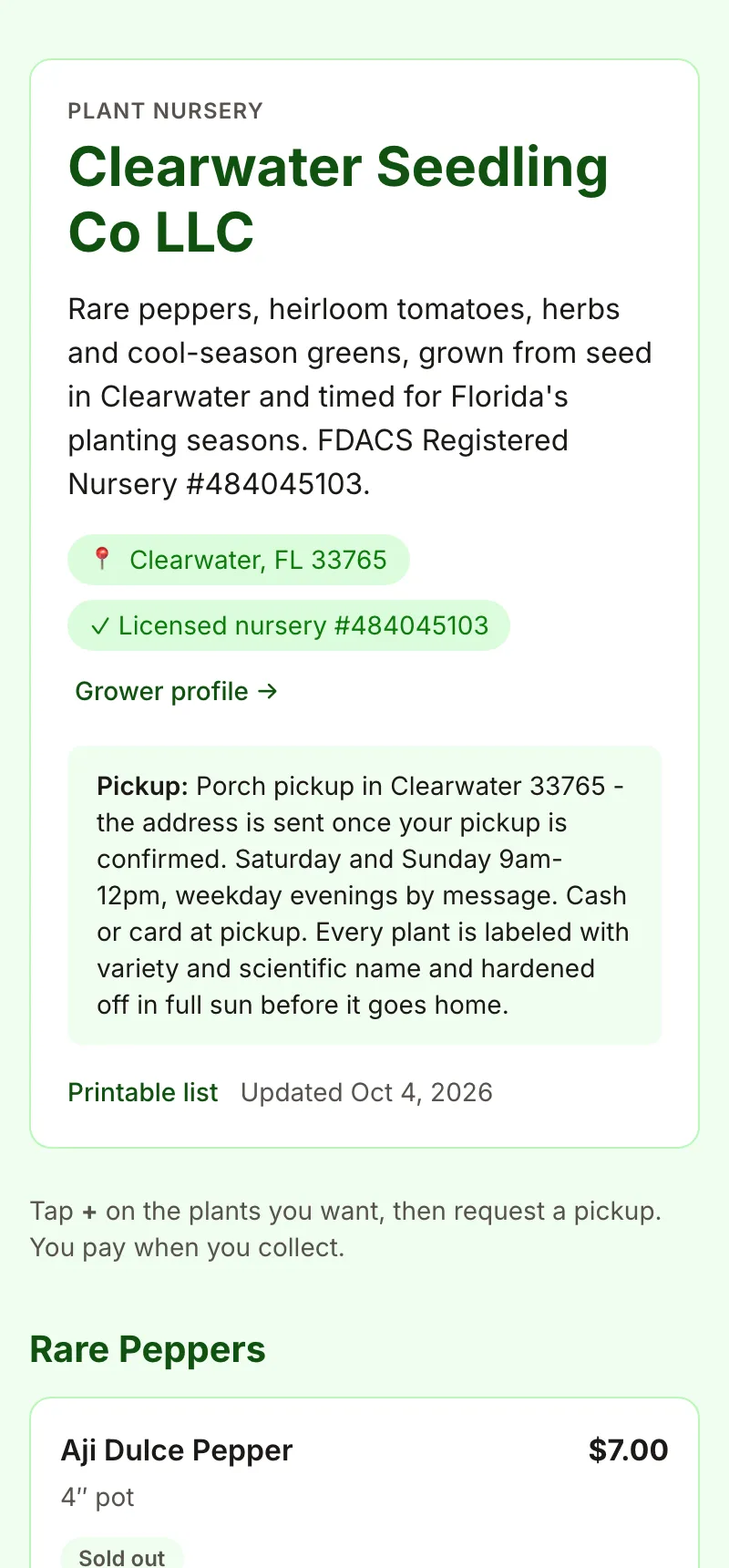
Clearwater Seedling Co's storefront on a phone: nursery name, blurb, location and license badges, and pickup instructions.

Priced for a backyard, not a garden center

Nursery tools are part of the regular garden.gg plans. No setup fee, no per-sale fee.

Bloom $5/mo

Private stock tools to try it on your bench.

  • Up to 25 active lots
  • Cost per plant and suggested price
  • Quick sale, sales log, dashboard, customers
  • Plant tags with care QR codes

Harvest $12/mo

Your storefront, open for reservations.

  • Unlimited lots
  • Public availability page with categories
  • Pickup reservations with buyer emails
  • Printable availability list and QR poster

For comparison, nursery ERP software typically runs $50–500/month and farm storefront platforms typically start around $79/month, often with setup and transaction fees on top.

Nursery FAQ

Does garden.gg handle my state nursery license?

No. garden.gg doesn't handle your state nursery license. Rules vary a lot: California requires a license for any rooted plant, Colorado exempts sellers under $1,000 a year, and Washington has a $20 plant-sale permit. Check with your state department of agriculture. If you have a license number, you can add it in Settings and it shows as a badge on your page.

Can buyers pay online?

Not yet. Reservations are pickup-and-pay-in-person: the buyer requests plants, you accept, and they pay you when they collect. You record how they paid (cash, Venmo, card, trade or other) when you mark the pickup. No money moves through garden.gg.

What about patented plants?

If a lot is linked to a cultivar flagged as patented or patent pending, garden.gg asks you to confirm you hold a propagation license before it can be listed publicly. You can always keep tracking it privately. It is a warning, not legal advice.

Who collects sales tax?

You do. Taxes, if any, are the seller's responsibility, and the storefront says so. The Sales page "Export CSV" gives you a clean record to work from.

Is there a mobile app?

Yes. The nursery tools are in the garden.gg iOS and Android apps as well as on the web, including the quick sale cart, which saves sales offline on a weak market signal and syncs later.

Which plan do I need?

Bloom ($5/month) includes private stock tracking for up to 25 active lots, the sales log and the dashboard. Harvest ($12/month) adds the public availability page, reservations, the printable list and QR poster, and unlimited lots.

New to selling? Start with how to run a backyard plant sale and how to price plants you propagate, or read the nursery setup guide.