
Sales and Customers
The Sales page
The Sales tab lists every sale and reservation pickup.
Date range: This month, Last month, This year, All time, or Custom (with From and To).
Filters:
- Lot (“All lots”)
- Sale event (“Any”)
- Paid with (“Any”): Cash, Venmo, Card, Trade, Other
- Buyer (“Anyone”)
Clear filters resets them. Totals for whatever you’ve filtered appear above the list: Revenue, Plants and Sales. Pickups from reservations carry a “Pickup” badge, returns a “Return” badge, and lines recorded together from the quick sale cart are tagged “Same sale”. Press Load more for older sales.
Export CSV
Export CSV downloads the sales you’re looking at, with your current filters applied, as nursery-sales.csv. It’s the easiest way to hand a season’s numbers to a spreadsheet or your tax preparer. Taxes are your responsibility; garden.gg doesn’t calculate or collect them.
Editing a sale
Click a sale to open Edit sale, where you can change the Date, Buyer (optional) and Note (optional), then Save (“Sale updated”). Quantities and prices are part of the stock history, so fix those with a return or an adjustment on the lot instead. Reservation pickups keep their own date: “Picked up Oct 4 — a reservation pickup keeps its own date.”
Customers
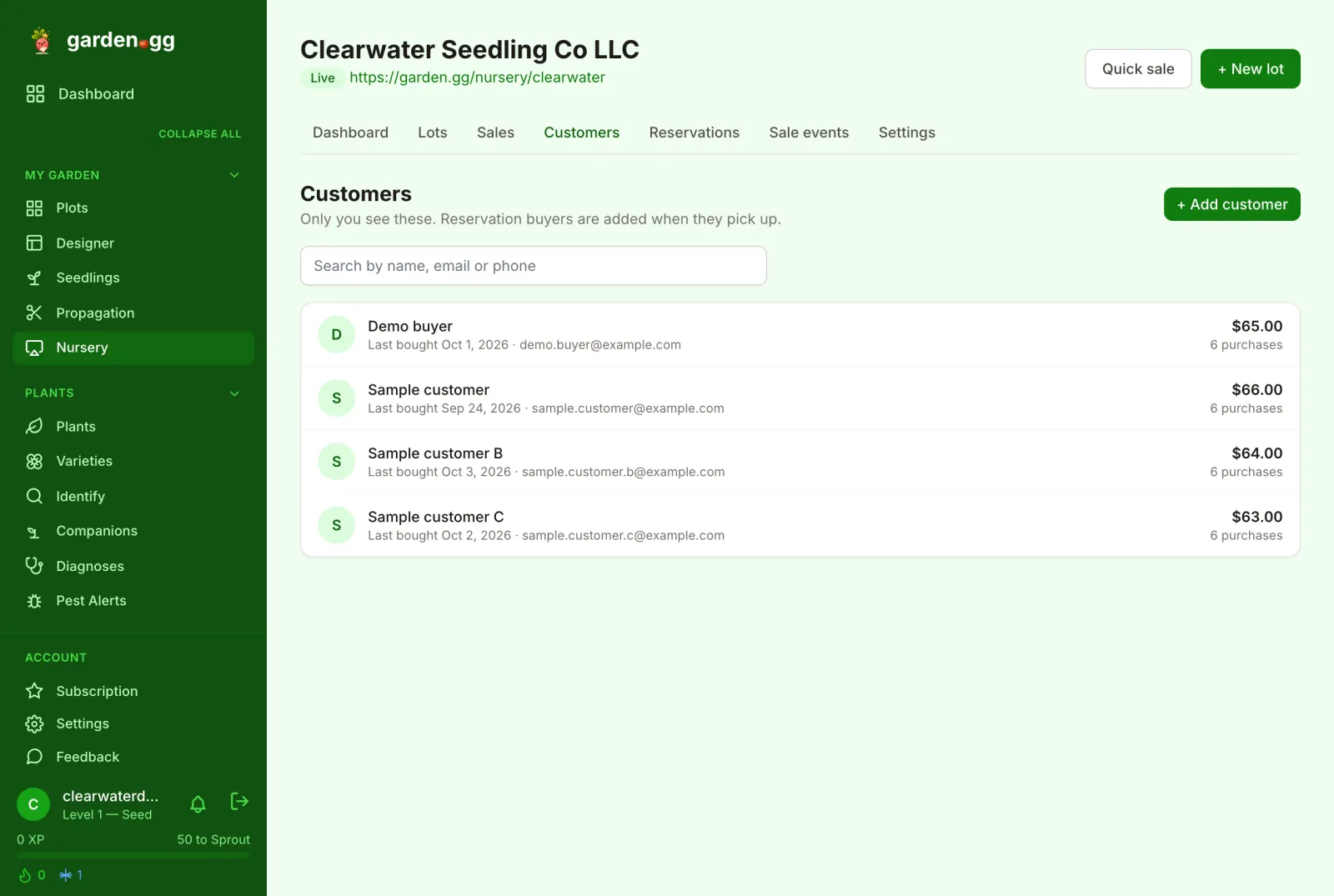
The Customers tab is your private buyer list: “Only you see these. Reservation buyers are added when they pick up.”
- + Add customer opens “New customer” with Name, Phone (optional), Email (optional) and Note (optional, only you see it).
- While recording any sale, the Buyer (optional) picker searches customers and offers ”+ Add new customer”.
- Search by name, email or phone. Each row shows purchases and total spent.
A customer page shows “Customer since …”, Spent, Purchases and Plants, “Recent purchases” (with All sales → to see them on the Sales page), contact details with Copy buttons, your note, and “Last bought …”.
Delete asks “Delete [name]?”: “Their sales stay in your records — they just won’t show a buyer any more.”
Retention of reservation customers
Customers added automatically from a storefront reservation are kept for a limited time. Their page says:
Added from a storefront reservation. Removed 12 months after their last purchase unless you edit or keep it.
Press Keep to keep them indefinitely (editing them does the same). Customers you added yourself are never removed automatically.
Dashboard reports
The Dashboard tab summarizes the same data: “Revenue this month” (with week and season), “Sold this month” with sell-through, “Losses this month” with loss rate, “Inventory value” at cost and retail, “Top sellers this month”, “Ready soon” and “Low stock”.